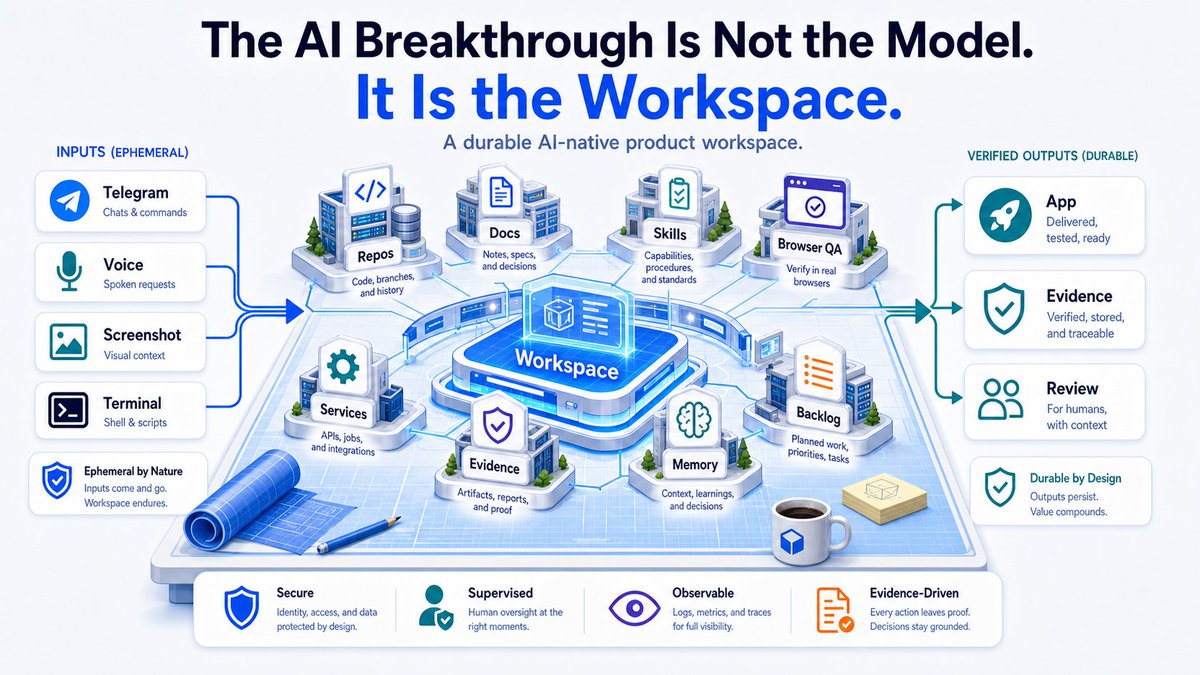
The AI Breakthrough Is Not the Model. It Is the Workspace.
Originally published on X ↗. A snapshot of the workspace at that time.
In this article
- The Output Gap
- The Core Pattern
- A Real Example of the Loop
- What an AI-Native Product Workspace Is
- The Center: One Durable OpenClaw Workspace on a Linux Droplet
- The Workspace as Source of Truth
- Skills Are Operating Procedures
- Multiple Control Surfaces, One Workshop
- Secure Access and Boundaries
- The Always-On Builder
- Browser QA and Evidence
- The Voice Layer: Continuous Auditable Telephony
- Explorer: The Internal Operator Cockpit
- What This Changes - And the Necessary Tradeoffs
- The Minimum Viable Version
- Final Thought
Note: With AI evolving daily, this is just a snapshot of my work over the past few months. I’m focusing specifically on the solo product builder -- saving enterprise architecture, microservices, and multi-agent orchestration for another day. I'm sharing my workflow with OpenClaw to spark ideas, but these exact same primitives apply to Codex, Claude Code, Google Spark, or Hermes. The tools will change, but the core primitives are here to stay -- and if you are serious about building with AI, this is the layer worth learning now.
I didn’t start this as a grand architecture project. I started because OpenClaw was fun.
It gave me something most AI coding workflows never delivered: a mobile-first way to route serious engineering work into a real workspace. I could spot a bug on my phone, send a note with a screenshot through Telegram, trigger a task, get status updates, and keep the product loop moving without being glued to my desk.
That experience hooked me. Over time it became an obsession with one core question:
What does AI-native product work actually look like when the agent has a real place to work?
Not a chat window. Not a pile of disconnected prompts. A durable product workspace.
This is a detailed breakdown of that workspace: how it is built, how the pieces fit together, and the primitives that make it work. I use OpenClaw, Codex, Claude, Telegram, Termius, OpenRouter, Telnyx, Tailscale, Cloudflare Access, RustDesk, Playwright, and a Linux droplet, but the patterns are portable. The harness changes. The primitives matter.
1. The Output Gap
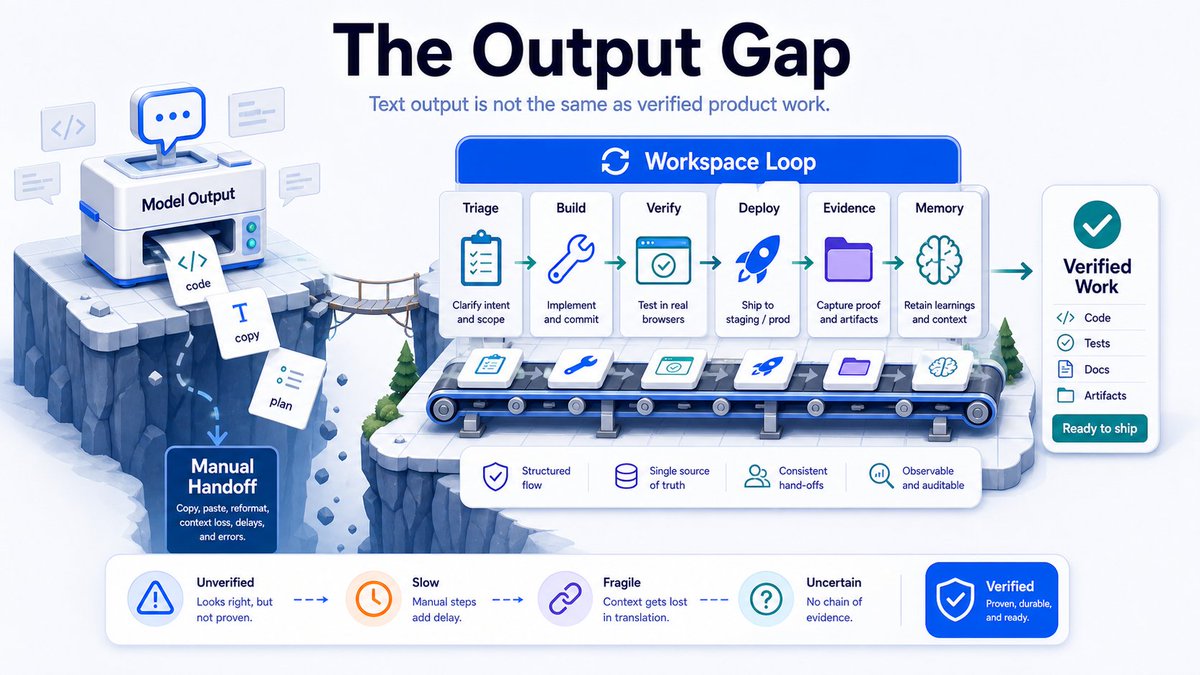
Most AI workflows still stop at output. The model generates code, copy, or a plan. Then a human has to move that output into reality: repos, builds, tests, browsers, deployments, logs, docs, and evidence.
That gap is where AI enthusiasm usually dies.
Typical flow: prompt → model output → human copy/paste → manual implementation → manual QA → manual deployment
The workspace loop looks different: messy input → triage → backlog → implementation → verification → deployment → evidence → memory
The difference is everything. One produces text. The other produces inspected, tested, deployed, and documented product work. The model matters, but the environment determines whether its output becomes reality.
2. The Core Pattern
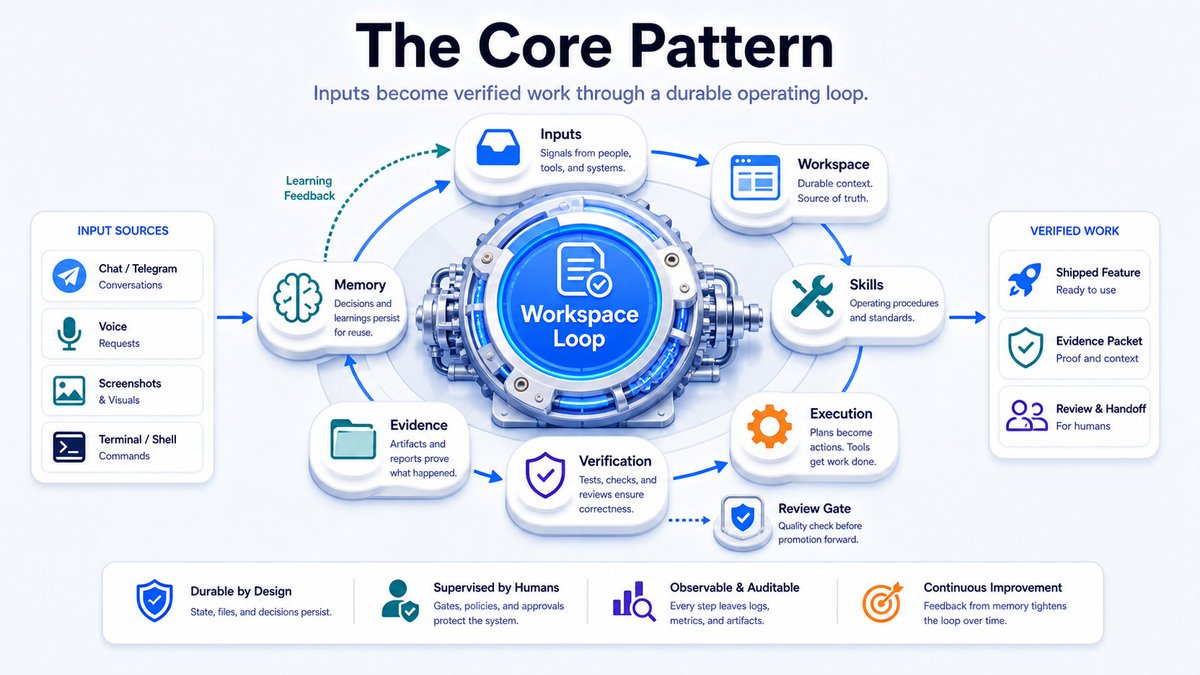
The real leverage comes from giving the model access to a structured workspace where it can inspect reality, follow operating procedures, make bounded changes, verify those changes, and leave behind receipts.
This is the shift: from AI as a text/image generator to AI as a participant in the full product loop.
3. A Real Example of the Loop
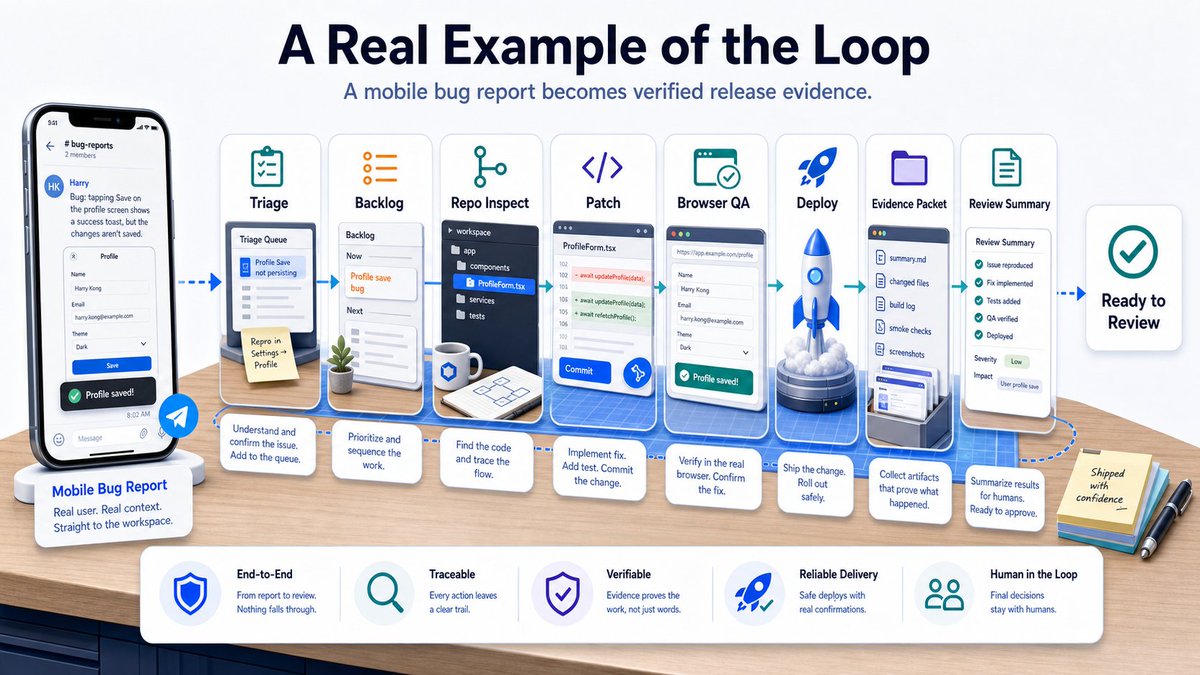
I notice a bug on mobile. I send a Telegram note with a screenshot. The task gets triaged into the right project backlog. The agent reads the project contract, checks the current release plan, inspects the repo, makes a bounded change, runs the build, runs tests, captures screenshots, deploys, writes an evidence packet, and sends me a clean review summary.
That is a different category of workflow. It is not “ask AI for code.” It is routing product intent into an operating system that can inspect reality, change files, verify outcomes, and leave receipts.
4. What an AI-Native Product Workspace Is
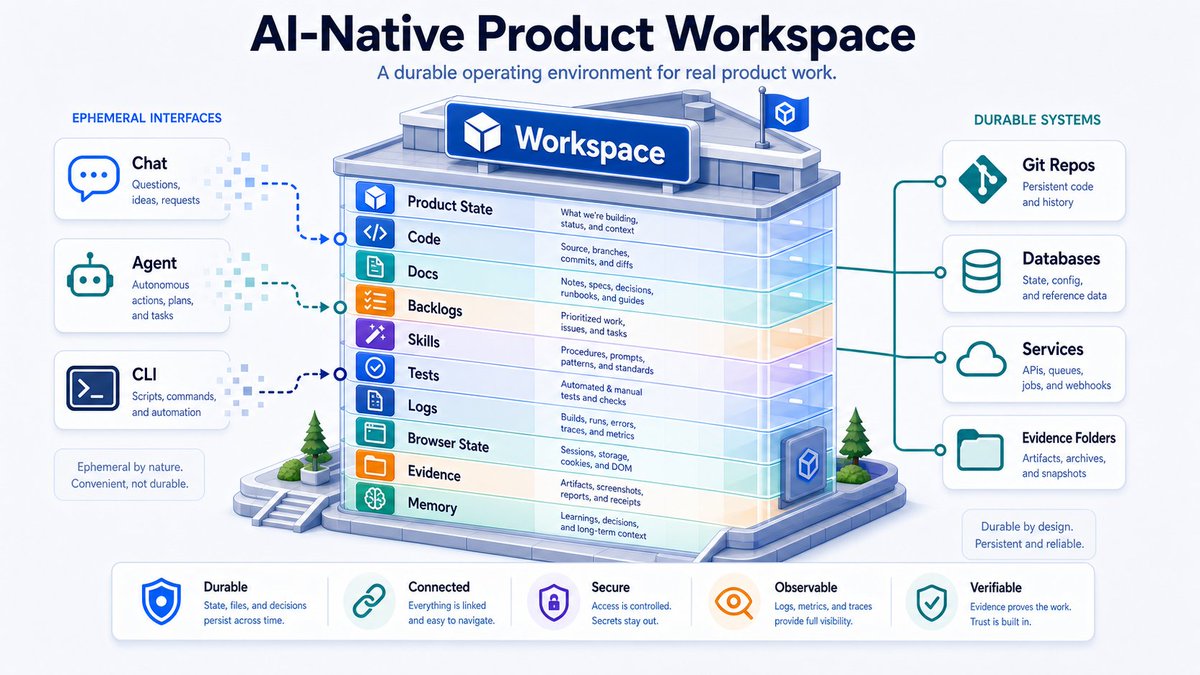
An AI-native product workspace is a durable operating environment where agents participate in the full product loop: research, planning, backlog shaping, implementation, QA, deployment, documentation, and iteration.
The workspace becomes the system of record for product work. It contains the project files, release plans, backlogs, skills, tool standards, secure access rules, browser QA paths, remote desktop state, voice handling, receipts, and evidence.
Agents do not just suggest changes. They inspect current state, follow defined procedures, modify real files, run verification, update docs, leave receipts, and preserve memory. Chat is an interface. The workspace is reality.
5. The Center: One Durable OpenClaw Workspace on a Linux Droplet
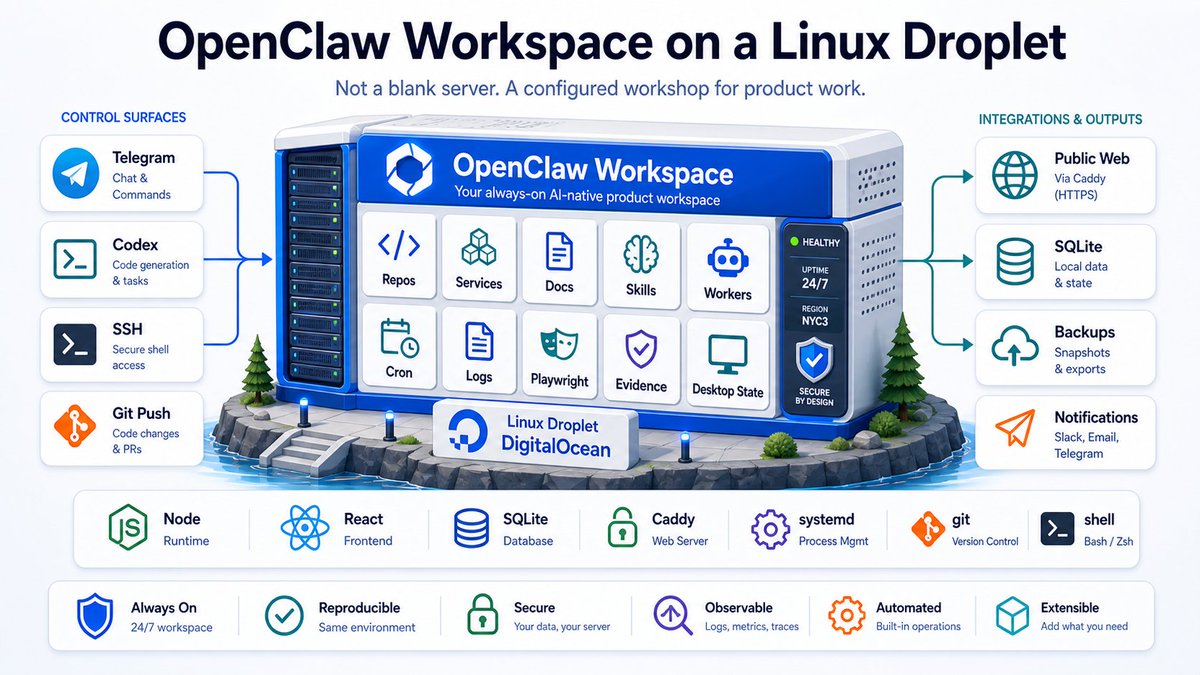
At the center is one always-on Linux builder box -- a DigitalOcean droplet running a fully configured OpenClaw workspace.
This is not a generic VPS with a chatbot. It is a structured workshop containing repos, services, docs, skills, cron jobs, workers, logs, memory files, evidence paths, Playwright automation, and remote desktop state.
The stack is intentionally boring and inspectable: Node/Express, React/Vite, SQLite, Caddy, systemd, journald, Playwright, git, and shell scripts. That boringness is the point. For a solo builder, one understandable box is a feature. It keeps coordination overhead low, makes inspection and repair easier, supports fast iteration, and keeps code, docs, tests, logs, browser state, and evidence tightly connected.
6. The Workspace as Source of Truth
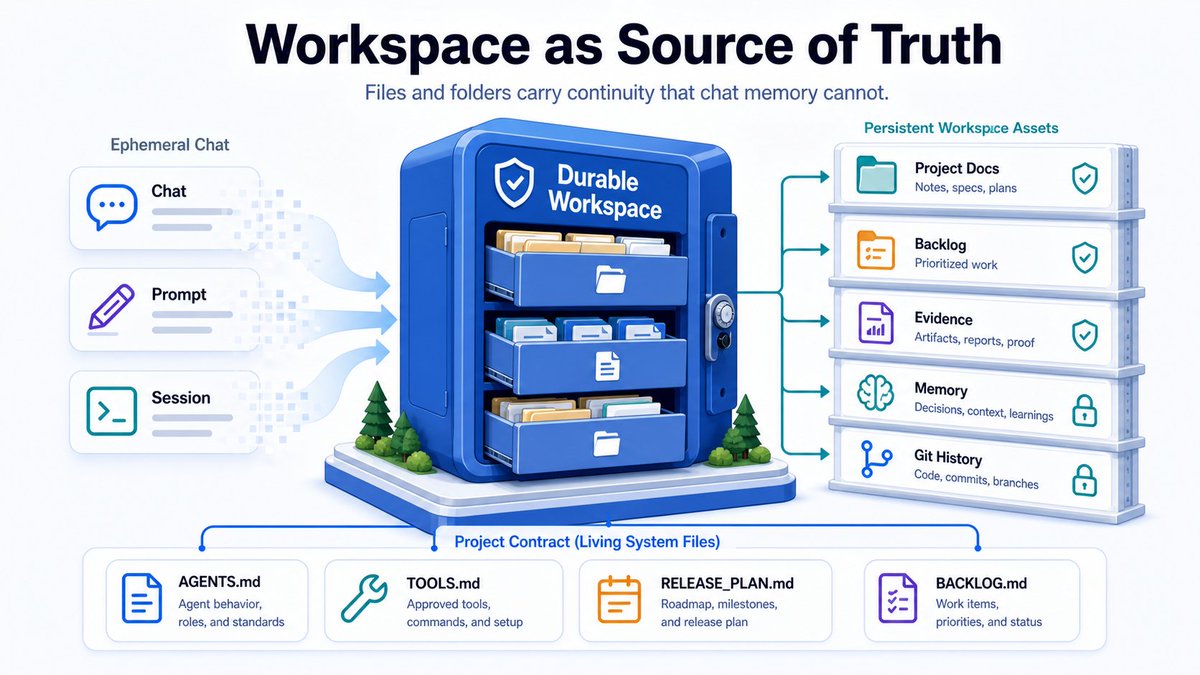
Everything is organized around files and folders, not chat memory.
workspace/
  ├── AGENTS.md          # Operating contract: behavior, git boundaries, safety rules
  ├── SOUL.md            # Identity and tone guidance
  ├── USER.md            # Durable user context and preferences
  ├── TOOLS.md           # Environment tool map: ports, services, Telegram topics, etc.
  ├── MEMORY.md          # Curated long-term memory
  ├── TECH_STACK.md      # Default build standards
  ├── GLOBAL_BACKLOG.md  # Cross-project priorities
  └── HEARTBEAT.md       # Proactive guidance for autonomous sessions
Each project has its own contract:
projects/example-project/
  ├── README.md               # Entrypoint: how to run it, where docs live
  ├── PROJECT_MISSION.md      # Product definition, target audience, and core value
  ├── RELEASE_PLAN.md         # Current release goal, definition of done, and guardrails
  ├── BACKLOG.md              # Concrete tasks ready to be picked up by automation
  ├── ARCHITECTURE.md         # Routes, data models, persistence, and services
  ├── TOOLING.md              # Local scripts, QA commands, and deploy runbooks
  └── CRON_WORKFLOW.md        # Autonomous worker contract for continuous execution
This structure survives changing models, changing interfaces, and changing context windows. The workspace still knows what the project is, what matters, what is safe, what is next, and what done means. That is the real unlock. The workspace carries continuity that the model itself cannot reliably hold.
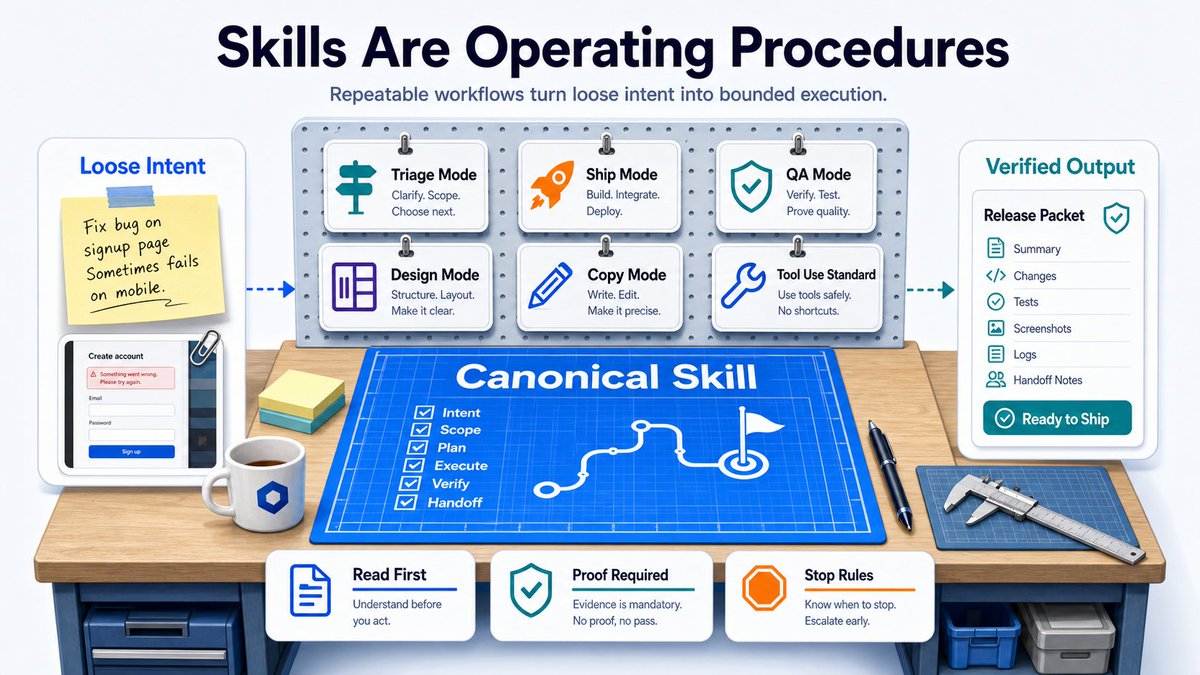
7. Skills Are Operating Procedures
Skills are the most important layer. A skill is not a prompt. It is a repeatable operating procedure. Canonical skills live in the shared workspace: Triage Mode, Ship Mode, QA Mode, Design Mode, Copy Mode, and others. Each skill defines:
- Purpose and entry criteria
- Required docs to read first
- Step-by-step execution path
- Tool usage and evidence standards
- Definition of done
- Failure conditions and handoff rules
This gives AI workflow discipline. A good skill tells the agent what mode it is in, what it is allowed to touch, what it must inspect first, what proof it must leave behind, and when to stop. It turns loose intent into bounded execution. Local interfaces use lightweight stubs that point back to these canonical skills. This keeps workflows consistent no matter which surface starts the work.
8. Multiple Control Surfaces, One Workshop
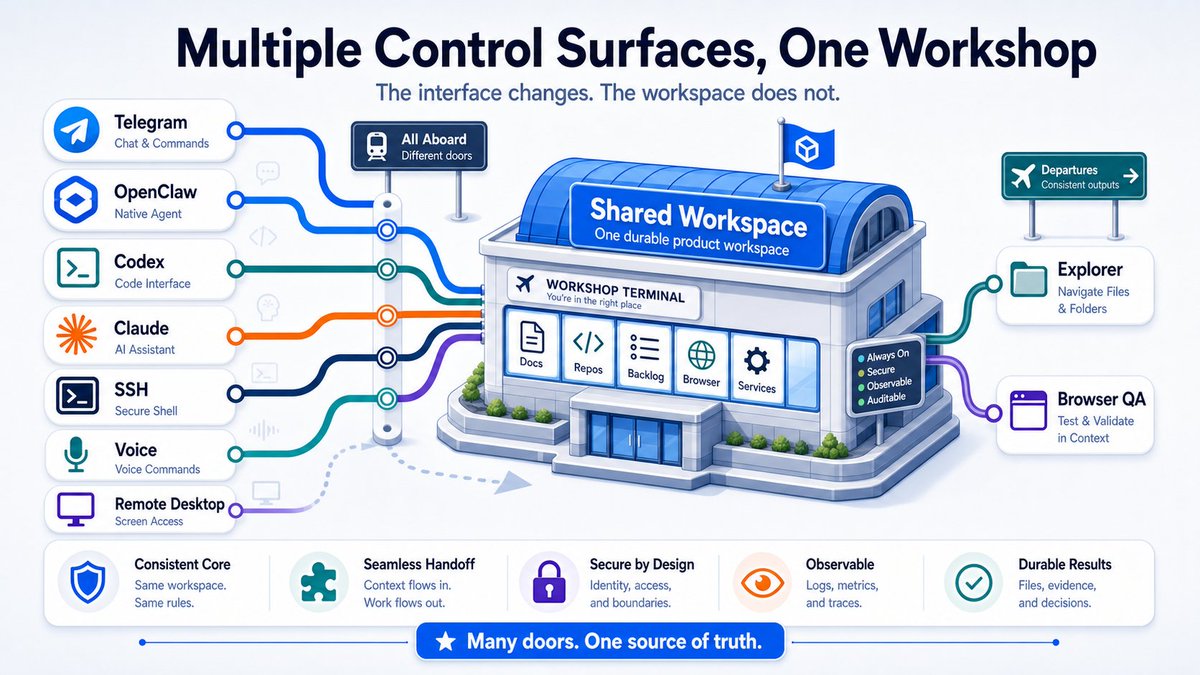
Different surfaces are useful in different contexts. Telegram is great when I am mobile: screenshots, quick notes, bug reports, status checks, and review packets. Codex, Claude, and OpenClaw are better for deep work: implementation, architecture, refactors, debugging, and documentation.
SSH is the repair layer. Explorer is the operator cockpit. Remote desktop gives me browser control. Voice gives me fast capture and retrieval when I am away from the keyboard.
But the important point is this: all of those surfaces route into the same workspace. The interface changes. The workshop does not.
9. Secure Access and Boundaries
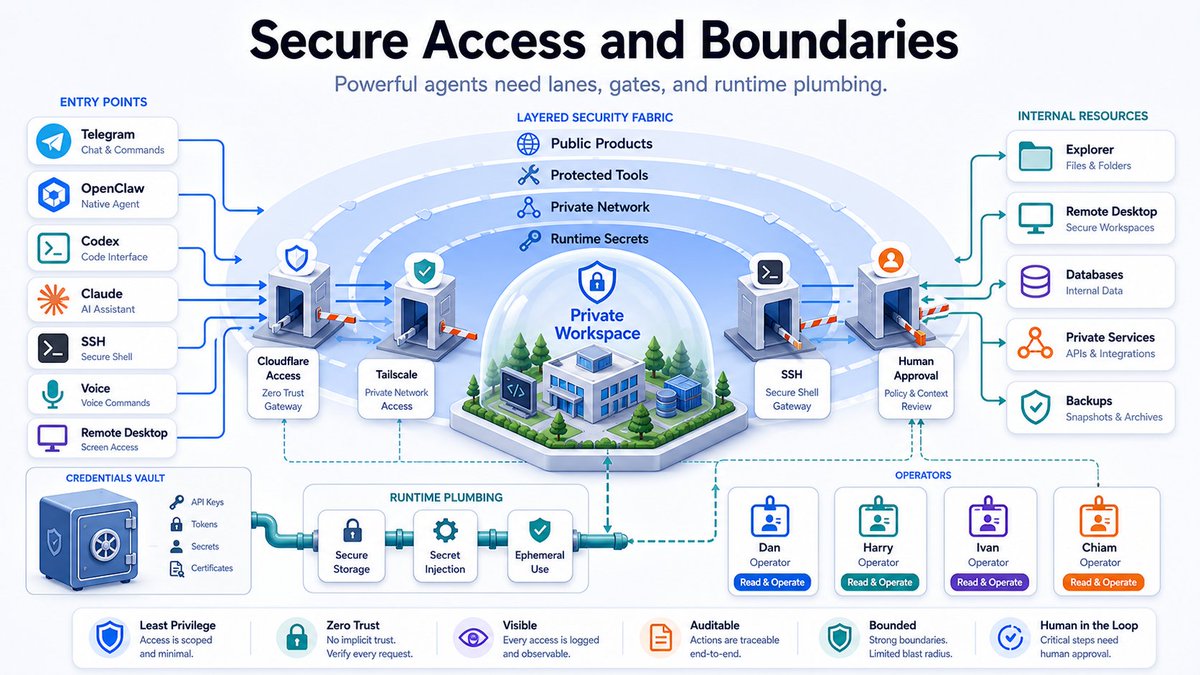
Access is deliberately layered. Public products stay public. Internal tools sit behind Tailscale and Cloudflare Access. Credentials live in runtime plumbing, not in prompts.
Operators have clear behavioral boundaries:
- Dan = human operator
- Harry = primary remote agent
- Chiam = local Codex desktop bridge
Agents can operate inside defined lanes, but they do not get casual access to secrets, broad production authority, or permanent memory. Access is scoped by surface, operator, and task type. A powerful workspace without boundaries is not leverage -- it is risk.
10. The Always-On Builder
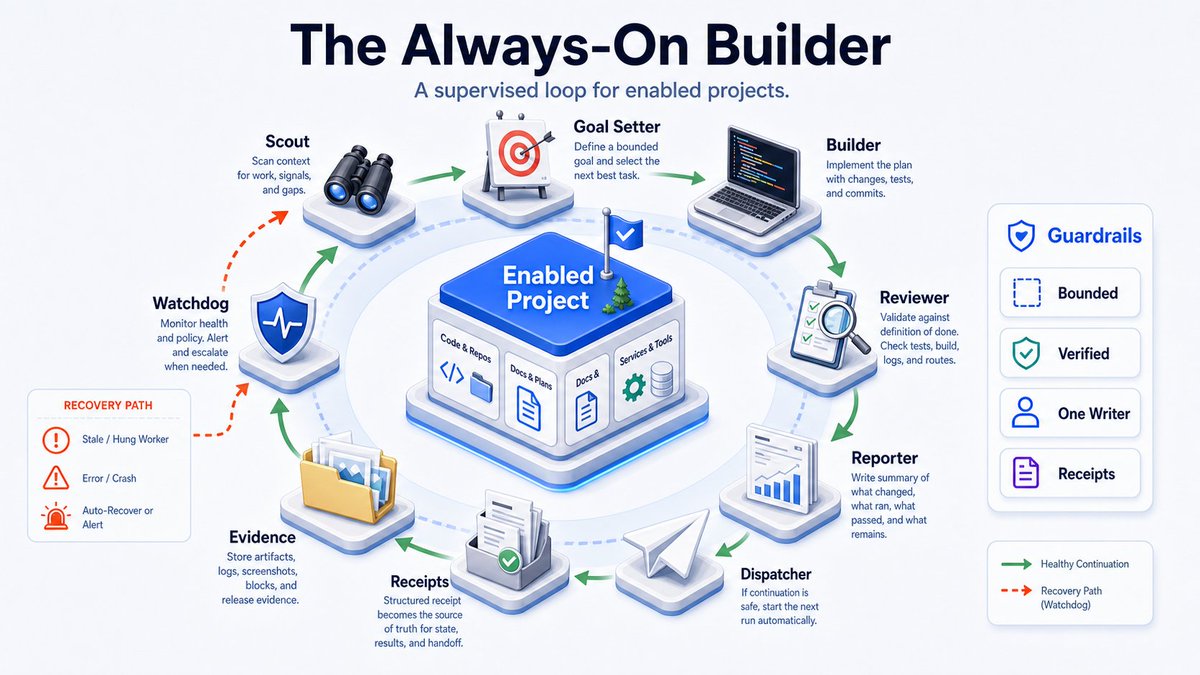
The most powerful part of the setup is the supervised continuous builder for enabled projects. It runs on two distinct clocks.
- At the host level: A systemd timer runs every five minutes. It handles the Dirty Repo Auto-Healer, the Orchestration Watchdog, and the Continuous Worker Dispatcher. It validates dirty repos, watches for stalled or failed runs, and decides when work is safe to continue.
- At the project level: The worker runs every ten minutes or when triggered by the dispatcher. It reads project contracts, uses the Scout routine to identify the next task, performs bounded implementation, runs validation, commits when safe, generates an evidence folder, writes a structured JSON receipt, and sends a clean Telegram review packet.
The mechanisms matter: Dirty Repo Auto-Healer validates current state before committing. Watchdog lives outside the worker so it can detect and revive stalled runs. This is where the system starts to feel different. The agent is not just waiting for prompts -- it has a safe, bounded way to continue useful work.
11. Browser QA and Evidence
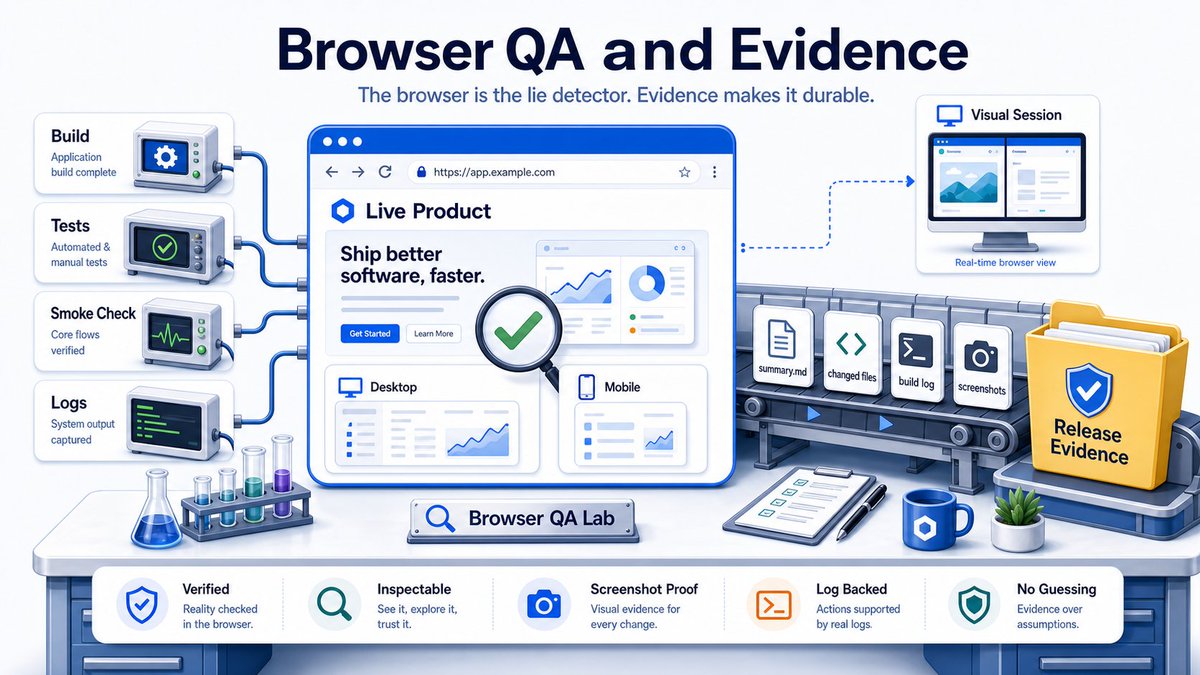
Browser QA is the best lie detector I have found. Headless Playwright is useful for fast DOM and script stability checks. Headed sessions through an authentic virtual desktop are useful for authenticated flows, visual checks, and cases where the browser itself is the real test.
Every meaningful release leaves a first-class evidence folder:
deploy/evidence/release-v2.1.0/
  ├── summary.md          # High-level overview of what changed and why
  ├── changed-files.txt   # Line-by-line git diff summary
  ├── build.log           # Production compilation stdout
  ├── test-results.txt    # Local suite output
  ├── smoke-checks.txt    # Live environment endpoint status checks
  └── screenshots/        # Before and after visual validations
This is slower than vibes, but much faster than blind debugging. It changes the trust model. I do not want an agent to tell me it worked. I want the agent to show the build, the test output, the live check, the screenshot, and the changed files. The evidence folder also becomes memory. Weeks later, I can inspect the release, see what changed, see how it was tested, and understand why it shipped.
12. The Voice Layer: Continuous Auditable Telephony
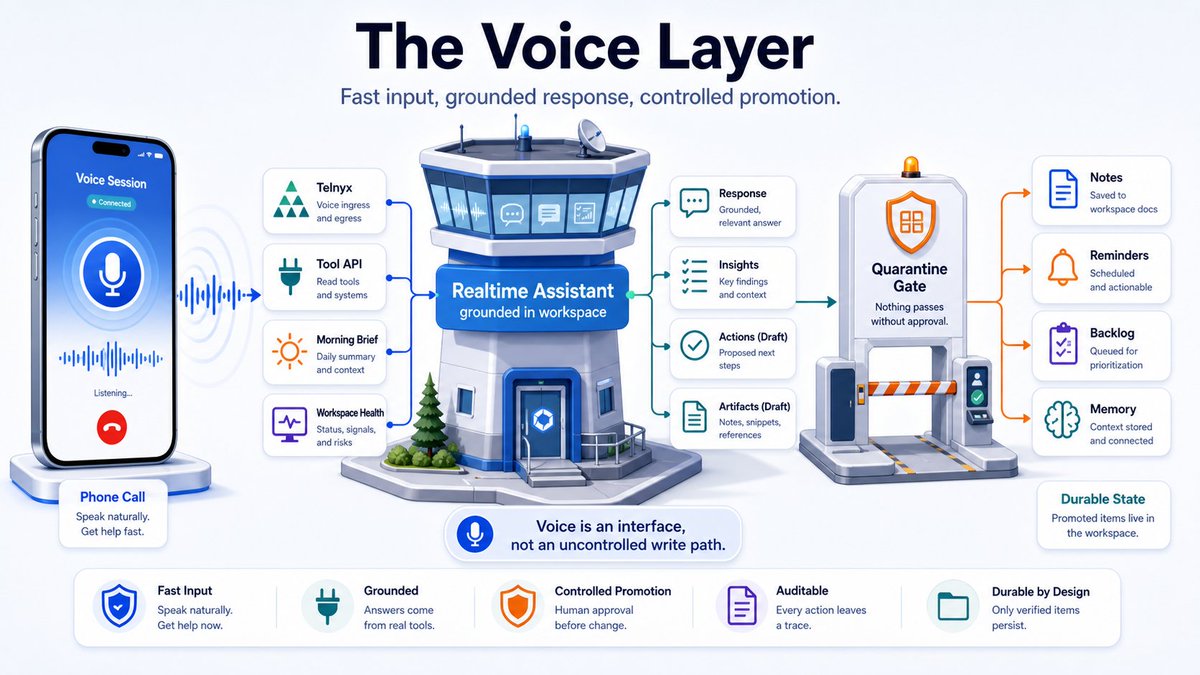
The system is not limited to text. A phone call reaches the same workspace via Telnyx. The voice architecture has three layers: Telephony (inbound/outbound and real-time audio), Real-Time Conversation (low-latency speech with vision when needed), and Control-Tower Tool API (focused tools for workspace health, reports, reminders, etc.).
Every weekday at 7 AM, the workspace compiles a morning brief: local weather, job runs, repo changes, and other useful context. When the call connects, the assistant can read the brief accurately because it is grounded in the workspace.
The important design principle is the quarantine gate. Spoken thoughts are messy. They route through Draft Transcript → Review / Quarantine State → Human Approval before becoming durable workspace source.
13. Explorer: The Internal Operator Cockpit
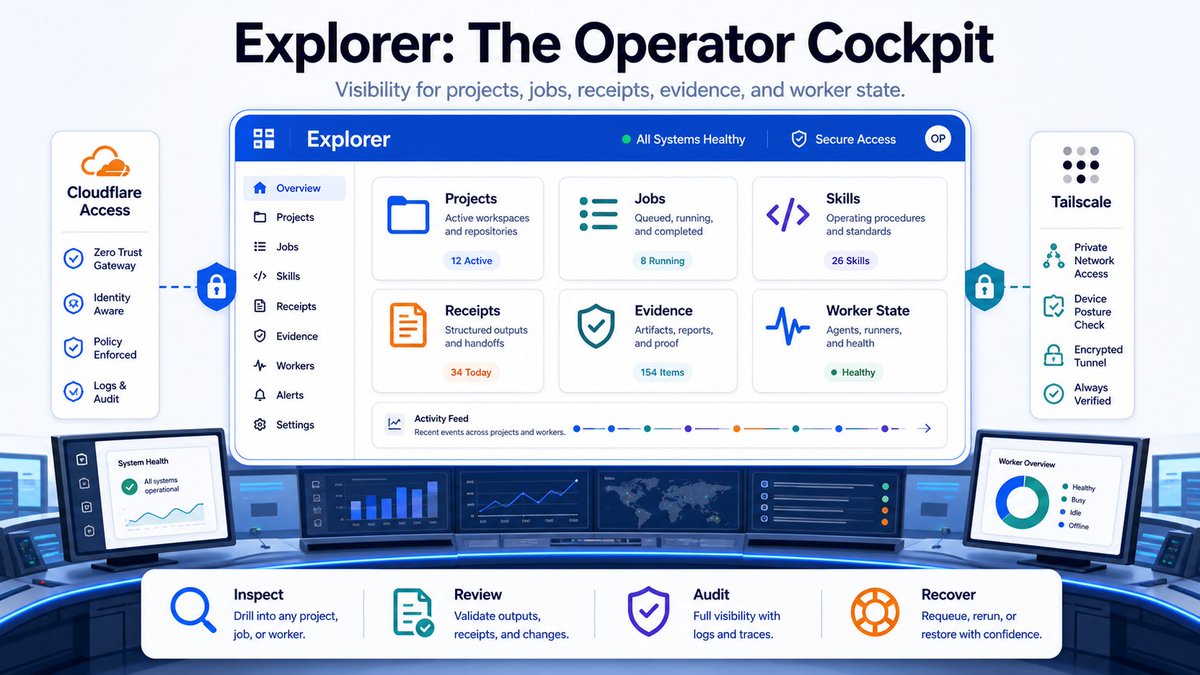
I built Explorer because headless systems need visibility. Explorer is a protected internal web surface for inspecting projects, jobs, skills, receipts, evidence, and worker state at a glance.
When you are dealing with headless environments and background workers, you need visibility without constantly grepping logs over SSH. Explorer gives me a clean operator cockpit: project status, recent runs, evidence, files, receipts, and worker state. It does not replace the workspace. It makes the workspace visible.
That part matters more than I expected. I can inspect running jobs, review receipts, browse evidence folders, and check whether a worker is healthy or stuck. Explorer does not come out of the box. It emerged because once agents start doing real work, observability becomes product infrastructure. If the workspace is the shop floor, Explorer is the control room.
14. What This Changes - And the Necessary Tradeoffs
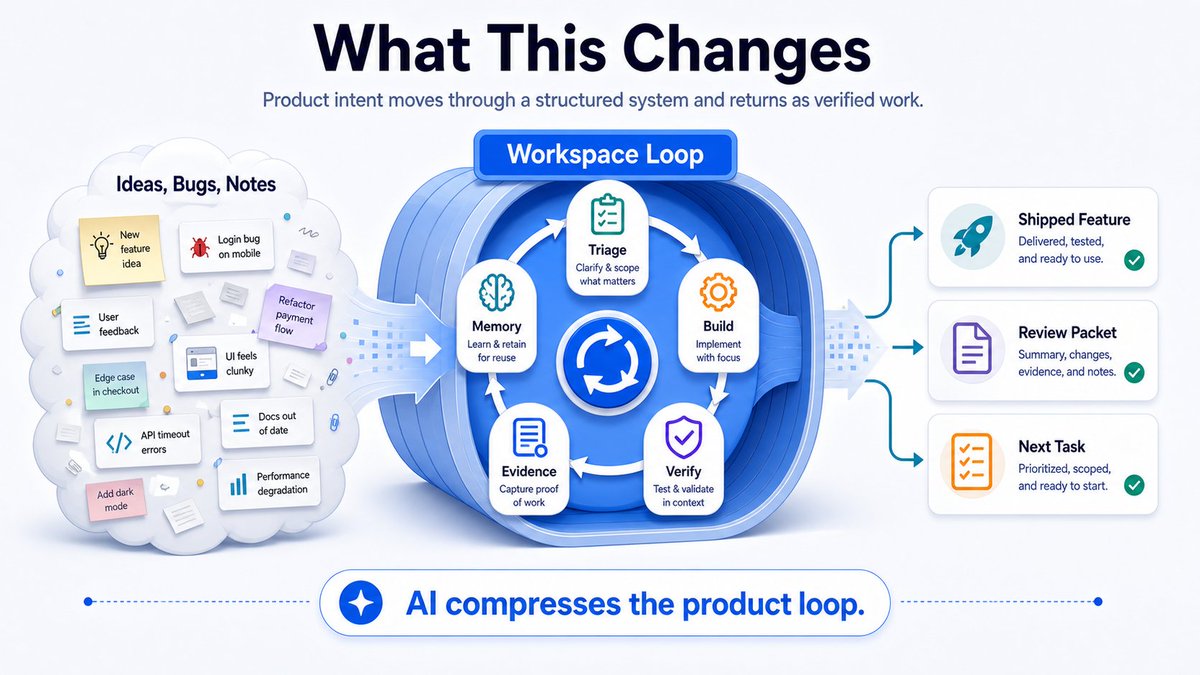
This setup compresses the full product loop for a solo builder. Research stays close to implementation. Implementation stays close to verification. Verification stays close to evidence. Evidence flows back into memory and planning. That changes the feel of building.
I can be away from my desk and still keep the product loop moving. I can throw messy input into the system without losing the thread. I can let agents do bounded work without pretending they are magic. I can inspect what changed, why it changed, whether it passed, and what needs review.
The real value is not that AI writes more code. The value is that product intent can move through a structured system and come back as verified work.
It also changes the question: No longer “Which model gave me the best answer?” The better question is, “Which environment helps the model do real work safely?”
Of course, this approach comes with deliberate tradeoffs:
- Single box: Less scalable than a distributed platform, but easier to inspect, repair, and understand.
- Boring stack: Not glamorous, but fast to debug under pressure.
- Human gates: Slower than full autonomy, but safer for memory, credentials, production actions, and ambiguous intent.
- Evidence requirements: More work upfront, but far less time wasted guessing what happened.
- File-based memory: Less magical than pure chat memory, but more durable, inspectable, and portable.
This system is designed around known AI failure modes: wrong changes, reality mismatches, silent failures, dirty repos, messy voice input, stale memory, and credential exposure. The point is not to pretend those risks disappear. The point is to design the workspace so those risks are contained.
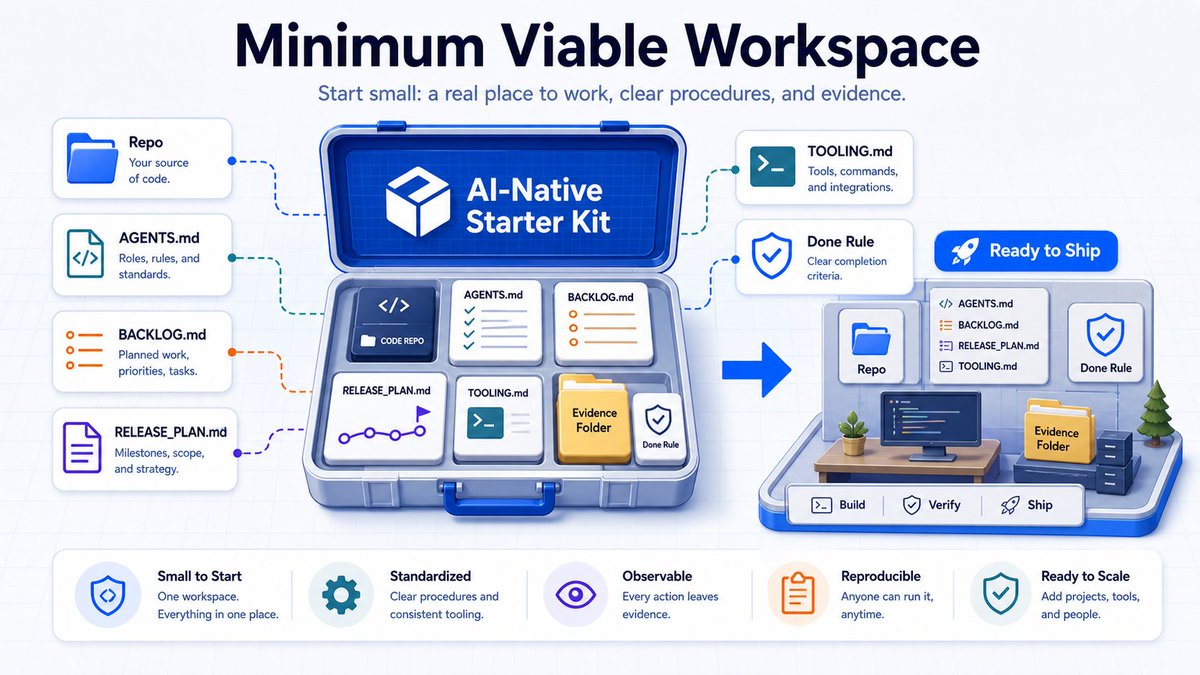
15. The Minimum Viable Version
You do not need the full setup to start. The minimum viable AI-native workspace is surprisingly small:
- One repo or project folder
- AGENTS.md with operating rules
- BACKLOG.md with ready tasks
- RELEASE_PLAN.md with the current goal and definition of done
- TOOLING.md with run, test, QA, and deploy commands
- An evidence folder for meaningful changes
- A rule that no work is done until it is verified and documented
That alone is a major upgrade from a pile of prompts. Once that works, you can add control surfaces, skills, workers, browser QA, remote desktop, receipts, voice, and dashboards.
But the foundation is simple: Give the agent a real place to work. Give it procedures. Give it boundaries. Give it evidence standards. Make the workspace the source of truth.
Final Thought
A model without a proper workspace is still mostly just a clever assistant.
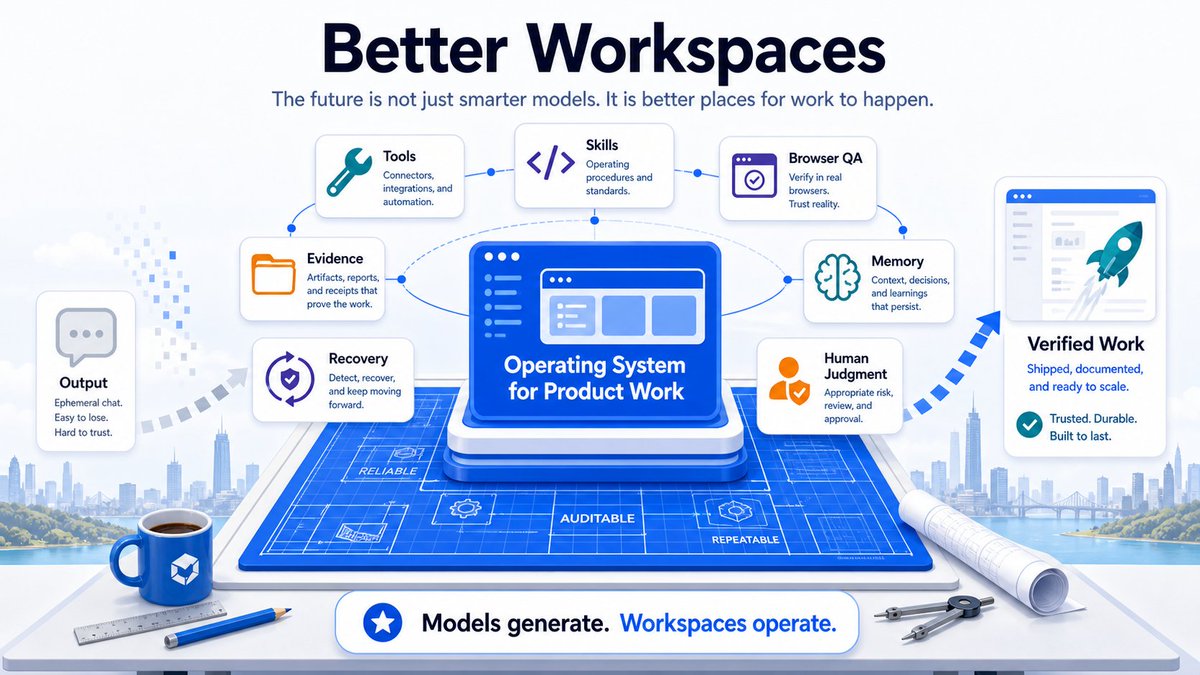
A durable, inspectable, supervised workspace turns that assistant into something that can actually operate: inspecting reality, shipping changes, verifying live results, recovering from failure, and keeping the product loop moving even when far away from the desk.
That is what I have built with OpenClaw. Not a better chatbot. An operating system for product work.
The future of AI-native product work is not just smarter models. It is better workspaces.
Note: This is the first time I am writing about these topics in detail. I may share more about the orchestration layer in the future.